"The Page Cannot be displayed error" in Internet Explorer and " The connection to the server was reset while the page was loading " error in Mozilla Firefox often bugs most of the users inspite of the very fact that they are sure they are connected to the internet. Accompanied with these errors are the problems such as the "Antivirus often stops updating" sites such as , stop opening...
If it is so then you are probably infected with conficker, or you are infected with the "72.233.114.123/tdss/crcmds/main" trojan.
Having Eset Smart Security on your system often will show an error message which is something like :
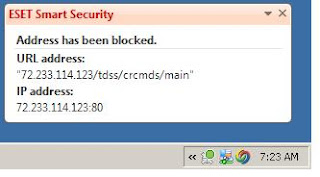
The Fix For "72.233.114.123/tdss/crcmds/main" trojan is :
*Go to Start > Control Panel > System > Hardware > Device Manager > View > Show Hidden Devices.
*Scroll down to “Non-plug and Play Drivers” and click the plus icon to open those drivers.
*Then search for “TDSSserv.sys”
*Right click on it, and select “Disable”
In simple terms, TDSSserv.sys is a service/server redirecting all software updates to 127.0.0.1 (your own computer) so they won’t update.
Then try executing the Downloaded Anti-spy wares if they fail to execute try renaming them. I personally would suggest you to try Malwarebytes which is a freeware from : www.malwarebytes.org
If The file fails to execute then try RENAMING THE DOWNLOADED SETUP FILE !!
Read more!
What Is Conficker :
Conficker, aka Downadup and Kido, is one of those nasty worms that sneaks into your PC by taking advantage of holes in Windows MS08-067. Conficker gets into your PC and then stops you from being able to visit anti-virus and anti-spyware websites. This of course makes it difficult for you to remove the infection. Conficker also has the uncanny ability to copy itself when you reboot your machine. One of the worse things that this horrible worm does is to spread itself to other PC’s over your network. Microsoft attacked this problem by releasing a patch to fix the Windows flaw. It is very important that you install this Microsoft patch and get critical updates. You should also run scans frequently with anti-spyware and anti-virus software that you can trust.
How Do I Detect If I am Infected with Conficker
If You are unsure whether you are infected with conficker, these are the following symptoms :
1. If you cannot get into security websites and services, check your computer as soon as possible.
2. If suddenly there are tasks created and scheduled on your computer, you may want to check if you already have a CF Worm running on it.
3. If you are being denied access to shared admin, this is a symptom of the Worm.
4. If you are being locked out of directory, then that is just one symptom.
5. You Might Consider Taking the test by visiting the floowing site : http://confickereyechart.net/
What does the Conficker worm do?
The Conficker worm has created secure infrastructure for cybercrime. The worm allows its creators to remotely install software on infected machines. What will that software do? We don’t know. Most likely the worm will be used to create a botnet that will be rented out to criminals who want to send SPAM, steal IDs and direct users to online scams and phishing sites.
The Conficker worm mostly spreads across networks. If it finds a vulnerable computer, it turns off the automatic backup service, deletes previous restore points, disables many security services, blocks access to a number of security web sites and opens infected machines to receive additional programs from the malware’s creator. The worm then tries to spread itself to other computers on the same network.
Steps of Removing W32/Conficker using Symantec Virus Removal Tool:
* Download Symantec W32.Downadup Removal Tool 1.1
* Disable System Restore and disconnect from the internet
* Run the tool to scan for Conficker worm
* Restart your computer and re-scan again to confirm there is no worm
I am not sure that these security tools can completely remove W32.Conficker from an infected system, but it surely is worth a try, so go for it.
3) Here is another W32.Conficker removal tool released just recently by McAfee, named as Stinger, which can remove 11 trojans including Conficker safely. Download McAfee’s Conficker Removal Tool.
Read more!


