 Facebook has been targeted in a new wave of phishing scams by someone who likes Austrian (,at) domain names.
The latest emails send viewers to the following Austrian registered domains: Areps.at, Bests.at, Kirgo.at, Nutpick.at, and Brunga.at. Like phishing attacks before it, the message is usually something simple, such as a subject line of “Hello
If a user falls for the scam, the email is sent to their friends, and the cycle continues. So far it’s not clear exactly what the intentions are with the scam besides the harvesting of login details.
If you’re not sure if the Facebook email you’ve received contains a legitimate link, be sure to check the URL before logging in, or if still in doubt, don’t click on any links received via email, and log in to Facebook directly to follow up.
Read more!
Video-sharing website YouTube has come under attack with hundreds of pornographic videos being uploaded onto its site.
The sexually explicit videos and inappropriate material were uploaded under the names of famous teenage celebrities like Hannah Montana and Jonas Brothers.
Many of the videos uploaded first started with footage of children's videos, and then continued on to adults performing graphic sex acts.
In one video titled ''Jonas Brother Live On Stage'', a user posted a comment saying: "I'm 12 years old and what is this?"
Under other uploaded videos, online users posted comments such as: "Take the tags off, you''ll get us caught."
Another said: "Your gonna kill us all!"
The raid on the website has shown how easy it is to upload porn onto a site, which is viewed by millions of people on a daily basis.
And as the videos were being uploaded, many viewers added them to their favourites and rated them highly.
One of the users believed to have uploaded the pornographic material videos was 21-year-old Flonty from Germany.
"I did it because YouTube keeps deleting music. It was part of a 4Chan raid," the BBC quoted him as saying.
4Chan is a bulletin board focusing on Japanese manga and anime, but some of its more extreme sections have been described on online message boards as "sick" and "horrifying stuff".
"Anything and everything can, and usually does, happen here. We have our very own unique culture, and there is no group quite like us anywhere out there," he said.
Flonty was asked if he was concerned that children could freely watch such inappropriate material on YouTube.
"Children will find inappropriate material around the internet anyway," he replied.
"This kind of raid showed how easy it is to upload porn to a website that millions of people browse on a daily basis," he added.
YouTube owner Google said that it was aware and addressing the problem.
"We are aware of the slew of pornographic videos that were uploaded," Google spokesman Scott Rubin said.
"We are addressing them as we would any video that violates our community guidelines.
"In addition, any account we discover that has been set up specifically to attack YouTube will be disabled," he added.
Read more!
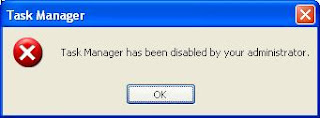
Enable Your Task Manager One Easy Step :
Enable or Disable Task Manager for the Current User...
http://www.dougknox.com/xp/utils/xp_taskmgrenab.htm
[Courtesy of MS-MVP Doug Knox]
If the method mentioned above does not work, You might try
* Open Registry Editor (Regedit.exe) and navigate to:
HKCU \ Software \ Microsoft \ Windows \ CurrentVersion \ Policies\ System
* In the right-pane, double-click DisableTaskMgr and set it's data to 0
Read more!
It is one of the most powerful Trojan /virus I have ever seen.. If your computer is infected with this virus " It will sends the nsl-school.org url to all of your friend list in yahoo messenger using your ID . So with in few hours many of your friends will get infected with it.
I don't know the actual target of the idiot who created it. May be to advertise his site or to steal very imp data from your computer. I resolved the problem manually from 2 infected PC's. Just go through the below steps carefully.
What are those links ?:
Nsl-school.org or other (Do not open this url in your browser).
If you are infected with it what is going to happen ?
1: It sets your default IE page to nsl-school.org, you can’t even change it back to other page. If you open IE from your comp some malicious code will automatically executed into your computer.
2: It will disables the Task manager / reg edit. So you can’t kill the Trojan process anymore.
3: Files that are gonaa installed by this virus are svhost.exe , svhost32.exe , internat.exe.
you can find these files in windows/ & temp/ directories.
4: It will sends the secured & protected information to attacker
How to remove this manually from your computer ?
1: Close the IE browser. Log out messenger / Remove Internet Cable.
2: To enable Regedit
Click Start, Run and type this command exactly as given below: (better - Copy and paste)
REG add HKCU\Software\Microsoft\Windows\CurrentVersion\Policies\System /v DisableRegistryTools /t REG_DWORD /d 0 /f
3: To enable task manager : (To kill the process we need to enable task manager)
Click Start, Run and type this command exactly as given below: (better - Copy and paste)
REG add HKCU\Software\Microsoft\Windows\CurrentVersion\Policies\System /v DisableTaskMgr /t REG_DWORD /d 0 /f
4: Now we need to change the default page of IE though regedit.
Start>Run>Regedit
From the below locations in Regedit chage your default home page to google.com or other.
HKEY_CURRENT_USER\SOFTWARE\Microsoft\Internet Explorer\Main
HKEY_ LOCAL_MACHINE\SOFTWARE\Microsoft\Internet Explorer\Main
HKEY_USERS\Default\Software\Microsoft\Internet Explorer\Main
Just replace the attacker site with google.com or set it to blank page.
5: Now we need to kill the process from back end. Press Ctrl + Alt + Del
Kill the process svhost32.exe . ( may be more than one process is running.. check properly)
6: Delete svhost32.exe , svhost.exe files from Windows/ & temp/ directories. Or just search for svhost in your comp.. delete those files.
7: Go to regedit search for svhost and delete all the results you get.
Start menu > Run > Regedit >
8: Restart the computer. That’s it now you are virus free.
I don’t know whether any removal patch that works for this Trojan/virus. But we can easily delete it manually.
Read more!
RESOLUTION
To resolve the issue, perform the following:
Click Start, Run.
Type gpedit.msc and click OK.
Navigate to the following path:
User Configuration\Administrative Templates\Start Menu and Taskbar
Double-click "Remove and Prevent Access to the Shut Down command"
Select "Not configured" or "Disabled"
Close Group Policy window.
Read more!


